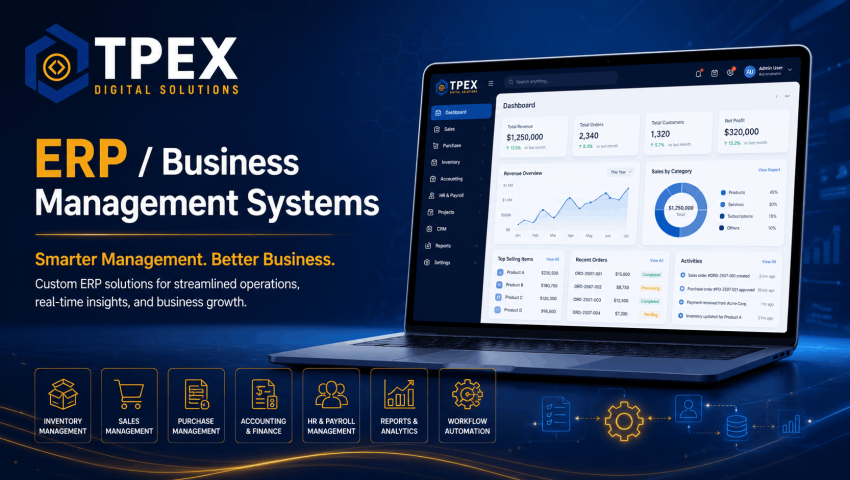
Tpex Digital Solutions develops custom ERP and business management systems that help companies manage operations, automate workflows, track data, improve productivity, and control business processes from one secure platform.
TPEX Digital Solutions develops custom ERP and Business Management Systems that help businesses manage operations with greater control, accuracy, transparency, and efficiency. A professionally developed ERP system brings important departments, workflows, records, users, approvals, reports, and business activities into one centralized digital platform.
Our ERP solutions are designed according to each client’s actual workflow rather than forcing the business to follow a fixed software structure. Whether you operate a small business, retail chain, distribution company, service organization, manufacturing setup, educational institute, or growing enterprise, we can develop a secure and scalable system tailored to your operational requirements.
Centralized Business Control
Manage departments, users, records, reports, approvals, transactions, and daily business activities through one secure and organized platform.
Automated Business Workflows
Reduce repetitive manual work, minimize errors, improve productivity, and speed up operations through customized workflow automation.
Custom ERP Solutions for Modern Business Operations
Many businesses still rely on spreadsheets, registers, paper files, separate applications, emails, and messaging platforms to manage operations. This often creates duplicate records, delayed approvals, reporting difficulties, weak accountability, and limited management visibility.
A custom ERP system connects important business functions into one platform. Authorized users can access relevant data, complete assigned tasks, submit approvals, monitor performance, and generate reports according to their roles and responsibilities.
Manage Your Business Smarter with a Custom ERP System
TPEX Digital Solutions develops secure, scalable, and easy-to-use ERP platforms that centralize data, automate operations, improve reporting, and support better business decisions.
- Real-Time Information
- Operational Control
- Secure & Scalable
ERP Modules We Can Develop
- Management Dashboard: Business summaries, performance indicators, charts, alerts, pending approvals, recent activity, and department-level information.
- Inventory Management: Products, categories, stock levels, warehouses, opening stock, stock transfers, adjustments, low-stock alerts, and movement history.
- Purchase Management: Purchase requests, quotations, purchase orders, supplier records, receiving, purchase returns, approvals, and payment tracking.
- Sales Management: Leads, quotations, sales orders, invoices, customers, returns, payments, discounts, and sales-performance reports.
- Accounts and Finance: Income, expenses, receivables, payables, cash accounts, bank accounts, vouchers, ledgers, and financial summaries.
- Human Resource Management: Employee records, departments, designations, attendance, leave, shifts, salaries, documents, and performance information.
- Payroll Management: Salary structures, allowances, deductions, overtime, bonuses, advances, payroll processing, and payslips.
- Customer Relationship Management: Leads, customers, follow-ups, communication history, sales stages, reminders, and service requests.
- Supplier Management: Supplier profiles, purchase history, outstanding payments, documents, products, and performance information.
- Project and Task Management: Projects, milestones, tasks, assignments, deadlines, progress, documents, and team collaboration.
- Asset Management: Business assets, assignments, locations, maintenance, depreciation information, and asset history.
- Document Management: Central storage of important files, contracts, forms, employee documents, invoices, and business records.
- Reports and Analytics: Customized operational, financial, sales, inventory, HR, customer, and management reports.
Inventory and Warehouse Management
Inventory management helps businesses understand what stock is available, where it is stored, how it moves, and when it needs to be replenished. The system can be developed for a single location or multiple warehouses.
- Product and category management
- Units, variants, and SKUs
- Opening stock
- Stock purchases and sales
- Warehouse transfers
- Stock adjustments
- Damaged and expired stock
- Low-stock alerts
- Batch and serial tracking where required
- Stock valuation reports
- Inventory movement history
- Multi-location stock visibility
Sales, Customers, and CRM
A combined sales and CRM module helps businesses track potential customers from the first inquiry through quotation, order, payment, and ongoing support.
- Lead and inquiry management
- Customer profiles
- Follow-up reminders
- Sales pipeline stages
- Quotations and proposals
- Sales orders and invoices
- Payment records
- Customer communication history
- Complaint and support records
- Customer-wise reports
- Salesperson performance
- Lead conversion reporting
Purchase and Supplier Management
Purchase management helps control procurement activities, supplier records, approvals, receiving, and payments. It also creates a clear history of what was purchased, from whom, at what cost, and under whose approval.
- Purchase requisitions
- Supplier quotations
- Purchase orders
- Approval workflows
- Goods receiving
- Purchase invoices
- Purchase returns
- Supplier payments
- Outstanding balances
- Supplier performance records
- Purchase history
- Cost comparison reports
Accounts and Financial Management
Financial information can be connected with sales, purchases, expenses, customers, suppliers, and other ERP modules. The exact accounting features depend on the client’s operational and reporting requirements.
- Income and expense management
- Cash and bank accounts
- Payment and receipt vouchers
- Customer receivables
- Supplier payables
- Account ledgers
- Journal entries where required
- Expense categories
- Cash-flow summaries
- Profit and loss reports
- Balance summaries
- Tax and financial reporting support
Human Resource and Payroll Management
The HR module centralizes employee information and helps organizations manage attendance, leave, payroll, documents, and departmental records more efficiently.
- Employee profiles
- Departments and designations
- Attendance and shifts
- Leave requests and approvals
- Salary structures
- Allowances and deductions
- Overtime and bonuses
- Payroll processing
- Payslip generation
- Employee documents
- Performance records
- Employee exit and clearance workflows
Role-Based Access and Approval Workflows
Not every employee should have access to every module or record. Our ERP systems can include role-based permissions so users only access the information and actions relevant to their responsibilities.
- Custom user roles
- Module-level permissions
- Create, view, edit, and delete controls
- Branch or department-based access
- Approval authorities
- Multi-level approval workflows
- Restricted financial information
- User activity logs
- Login and session controls
- Administrative audit history
Workflow Automation
Workflow automation reduces delays and repetitive manual work by allowing the system to perform actions according to predefined business rules.
Automation may include:
- Automatic reference and invoice numbers
- Low-stock notifications
- Pending approval alerts
- Payment due reminders
- Customer follow-up reminders
- Email or system notifications
- Automatic status updates
- Recurring invoices or tasks
- Document expiry alerts
- Scheduled reports
- Employee attendance calculations
- Payroll calculations
Reports, Dashboards, and Business Intelligence
A major advantage of a centralized ERP system is access to timely and organized business information. Reports can be customized according to the needs of management, departments, branches, and operational teams.
- Daily and monthly business summaries
- Sales and purchase reports
- Inventory and warehouse reports
- Customer and supplier reports
- Expense and financial reports
- Employee and attendance reports
- Project and task reports
- Branch-wise performance
- Product profitability
- Outstanding receivables and payables
- Custom filters and date ranges
- Export to Excel or PDF where required
Multi-Branch and Multi-Location Management
Businesses operating across different branches, warehouses, stores, or offices can manage data from one central platform while maintaining separate records and permissions for each location.
- Multiple branches and warehouses
- Location-based users
- Branch-specific inventory
- Branch-wise sales and expenses
- Inter-branch stock transfers
- Centralized management dashboard
- Combined and individual reports
- Location-based approvals
- Separate numbering sequences
- Role-based branch access
ERP Integrations
The ERP system can be connected with other applications and services according to the business requirements and availability of suitable APIs.
- E-commerce websites
- Payment gateways
- Point-of-sale systems
- Barcode scanners and printers
- Biometric attendance systems
- Email and SMS services
- WhatsApp communication tools
- Accounting systems
- Courier and logistics services
- Customer support platforms
- Google Analytics and reporting tools
- Third-party APIs
ERP Security and Data Protection
Business systems contain sensitive operational and financial information. We apply suitable security practices according to the selected hosting environment, technology, project scope, and client requirements.
- Secure user authentication
- Role-based permissions
- Encrypted HTTPS connections
- Secure password handling
- Session controls
- Administrative activity logs
- Input validation
- Protection against common web vulnerabilities
- Regular backups
- Database access controls
- Software and dependency updates
- Security monitoring and maintenance options
Cloud-Based and On-Premise Deployment
The ERP system can be deployed according to the business’s operational, security, access, and infrastructure requirements.
- Cloud-Based ERP: Accessible through authorized devices over the internet, suitable for remote teams and multiple locations.
- Private Server Deployment: Hosted on a dedicated or virtual private server controlled by the business.
- On-Premise Deployment: Installed on the organization’s internal infrastructure where suitable and technically supported.
- Hybrid Deployment: A customized combination of local and cloud-based infrastructure according to business needs.
ERP Solutions for Different Industries
Our custom ERP and business systems can be developed for different operational environments, including:
- Retail and wholesale businesses
- Distribution companies
- Manufacturing organizations
- Construction and real estate companies
- Educational institutes
- Healthcare organizations
- Service providers and agencies
- Restaurants and hospitality businesses
- Logistics and transport companies
- E-commerce businesses
- Nonprofit organizations
- Multi-branch companies
Our ERP Development Process
- Business Process Analysis: We study your departments, current workflows, forms, reports, approvals, challenges, and operational goals.
- Requirement Documentation: Functional requirements, modules, users, permissions, reports, integrations, and project boundaries are documented.
- System Architecture and Planning: We plan the database, modules, dashboards, workflows, technology, security, and deployment approach.
- UI and User Experience Design: Interfaces are designed to make daily tasks organized, understandable, and efficient for different users.
- Module Development: The system is developed in planned phases according to the approved scope.
- Testing and Quality Assurance: Modules, permissions, calculations, reports, workflows, and integrations are tested.
- Data Setup or Migration: Initial records or approved legacy data can be imported according to the project scope and data quality.
- User Training: Authorized users receive guidance on the relevant modules and workflows.
- Deployment: The approved system is deployed to the selected hosting or server environment.
- Support and Improvement: Ongoing maintenance, fixes, new modules, reports, and improvements can be provided.
Data Migration and Initial Setup
Existing business data may be stored in spreadsheets, old software, registers, or separate databases. Where technically possible, we can assist with organizing and importing approved data.
Data-migration work may include:
- Data-format review
- Template preparation
- Customer and supplier import
- Product and stock import
- Employee records
- Opening balances
- Historical records where feasible
- Duplicate-data identification
- Import testing
- Post-import verification
Data migration depends on the quality, completeness, structure, and compatibility of the existing data and may require a separate scope.
Training and User Adoption
An ERP system provides value when employees understand how to use it correctly. We provide role-focused guidance according to the modules and workflows included in the project.
- Administrator training
- Department-level user training
- Workflow demonstrations
- Role and permission guidance
- Reporting instructions
- Basic troubleshooting guidance
- User manuals or documentation where included
- Post-launch support options
ERP Maintenance and Ongoing Support
Business requirements change over time, and management systems may require updates, new reports, modules, integrations, performance improvements, and technical maintenance.
Support services can include:
- Bug fixes and technical support
- Server and deployment assistance
- Software and dependency updates
- Database maintenance
- Backup monitoring
- Security updates
- Performance optimization
- New reports and dashboards
- Additional modules
- Workflow changes
- API integrations
- User and permission changes
Benefits of a Custom ERP System
- Centralizes business data and operations
- Reduces repetitive manual work
- Minimizes errors and duplicate records
- Improves accountability and workflow visibility
- Speeds up approvals and reporting
- Provides real-time management information
- Improves coordination between departments
- Strengthens data security and access control
- Supports multi-branch operations
- Scales with future business requirements
Why Choose TPEX Digital Solutions?
- ERP systems customized according to actual business workflows
- Modular and scalable development approach
- Secure role and permission management
- User-friendly dashboards and interfaces
- Custom reports and approval workflows
- Integration with relevant business tools
- Clear requirement analysis and documentation
- Training and post-launch support options
- Solutions for small businesses, SMEs, and larger organizations
- Remote development services for clients in Pakistan and worldwide
Frequently Asked Questions
What is an ERP system?
An ERP system is a centralized software platform that connects important business functions such as inventory, purchases, sales, finance, employees, customers, projects, and reporting.
Is your ERP software ready-made or customized?
We primarily develop and customize ERP solutions according to the client’s business workflow, required modules, reports, roles, and integrations.
Can we start with a few modules?
Yes. A modular approach can allow the business to begin with priority modules and add further functionality in later phases.
Can the ERP support multiple branches?
Yes. The system can support multiple branches, warehouses, offices, users, and location-specific reports according to the project requirements.
Can employees have different access levels?
Yes. Role-based permissions can control which modules, records, reports, and actions are available to each user.
Can you import data from Excel or existing software?
Data may be imported where the existing format is complete, organized, and technically compatible. Data cleaning, transformation, and migration may require a separate scope.
Can the ERP be used on mobile devices?
A responsive web-based ERP can be accessed through supported mobile, tablet, laptop, and desktop browsers. A separate mobile application can also be discussed if required.
Do you provide training and support?
Yes. User training and post-launch support can be included according to the selected package and project agreement.
Is the ERP system secure?
We implement suitable security controls such as authentication, permissions, HTTPS, validation, activity logs, backups, and maintenance practices. Security also depends on hosting, server management, user behavior, and ongoing updates.
How long does ERP development take?
Development time depends on the number of modules, workflow complexity, integrations, reports, data migration, testing, training, and approval process. A detailed timeline is prepared after requirement analysis.
How much does a custom ERP system cost?
Cost depends on required modules, number of users, branches, workflows, reports, integrations, deployment, data migration, and support requirements. You can select an available package or request a customized quotation.
Do you work with international clients?
Yes. TPEX Digital Solutions provides ERP and business management system development services to clients in Pakistan and worldwide through remote consultation, project-management tools, and online collaboration.
Build a Business Management System Around Your Workflow
Contact TPEX Digital Solutions to discuss your departments, current processes, operational challenges, reporting needs, required modules, users, branches, and future growth plans. Our team will help you define a suitable ERP solution based on your business requirements and budget.
Request a Free ERP Consultation
Custom ERP and business management solutions designed according to your workflows, departments, users, modules, and reporting requirements.
ERP & Business Management System Packages
Monthly
Yearly
Basic Business Portal
PKR 180,000/ One Time
/ Yearly
-
Custom dashboard
-
User login and roles
-
Basic data management
-
Forms and records
-
Basic reports
-
Responsive web interface
-
Deployment support
-
Basic training
Custom Management System
PKR 300,000/ One Time
/ Yearly
-
Multiple business modules
-
Role-based permissions
-
Dashboard and reports
-
Workflow management
-
Data filters and exports
-
Admin panel
-
Testing and deployment
-
Training and support
ERP System
PKR 500,000/ One Time
/ Yearly
-
Dashboard and analytics
-
Inventory module
-
Purchase management
-
Sales management
-
Accounts and finance basics
-
User roles and permissions
-
Reports and exports
-
Testing, deployment, and training
Advanced ERP / Multi-Branch System
PKR 900,000/ One Time
/ Yearly
-
Multi-branch support
-
Multi-warehouse inventory
-
Advanced approval workflows
-
Department-wise permissions
-
Advanced reports and dashboards
-
Audit logs
-
Custom modules
-
Deployment, training, and support